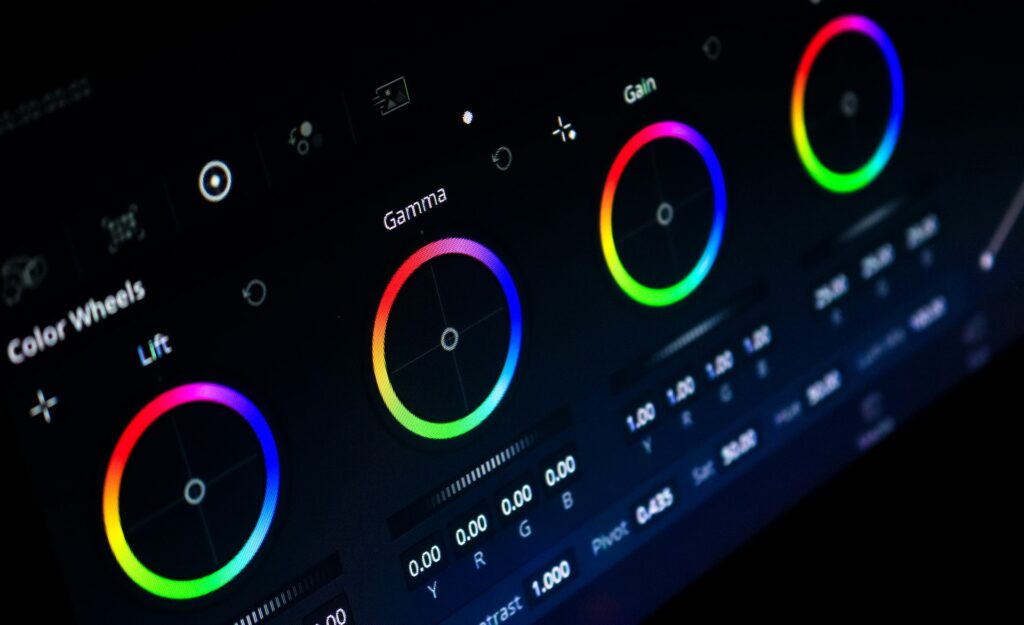
The art of color grading stands as a pivotal element that can transform your footage from mundane to mesmerizing. A study conducted by Adobe revealed that 33% of viewers will stop engaging with a video if the quality is subpar. So, if you’re looking to captivate your audience and keep them hooked, mastering the skill of color grading is paramount.
The Basics of Color Grading
Calibrated Monitors
To embark on your color grading journey, you need the right tools, and that starts with a calibrated monitor. This device ensures that what you see is what your audience will see, maintaining color accuracy throughout the process.
Understanding Color Spaces
Color spaces like Rec. 709 and P3 dictate the range of colors available for your grading. Knowing which space to use is vital. For example, Rec. 709 is ideal for standard HDTV content, while P3 is used for digital cinema. Choose wisely to match your output medium.
The Power of a Flat Profile
For maximum control during color grading, shooting in a flat profile is a game-changer. It retains more color information and provides flexibility in post-production.
Software and Tools for Color Grading
Exploring Color Grading Software
Industry-standard software like Adobe Premiere Pro, DaVinci Resolve, and Final Cut Pro offer a wide array of grading tools. The choice of software often depends on your personal preference and the specific requirements of your project.
Hardware Tools for Precision
To take your color grading to the next level, consider investing in color grading panels and colorimeters. These tools offer precision and efficiency, streamlining your workflow.
Free vs. Paid Options
Whether you’re a budget-conscious beginner or a seasoned pro, there are both free and paid options available for color grading software and tools. Evaluate the pros and cons to find what suits you best.
Preparing Your Footage for Color Grading
Organizing Your Clips
A well-organized workflow ensures you can focus on the creative aspects of color grading. Label, tag, and organize your clips to keep your project manageable.
Color Correction vs. Color Grading
Understanding the distinction between color correction and color grading is crucial. Color correction involves fixing issues like exposure and white balance, while color grading imparts a specific look or mood to your video.
The Magic of LUTs (Look-Up Tables)
LUTs are a handy starting point for color grading. They provide predefined color adjustments and can be a great launchpad for your grading process.
The Art of Color Grading
Mastering Color Wheels and Curves
Color wheels and curves are your brushes and palette in the world of color grading. They allow precise control over color and luminance, helping you achieve the desired look.
Evoke Emotions with Colors
Colors have a profound impact on emotions. Understand the psychological effects of different colors to convey the intended mood in your video.
Consistency Is Key
Maintaining consistency in color grading across all your shots is vital for a professional-looking video. Ensure your color palette is cohesive throughout the project.
Advanced Color Grading Techniques
Creating a Cinematic Look
For that cinematic allure, experiment with techniques like adding cinematic bars, creating lens flares, and enhancing contrast.
Highlighting Details
Make specific elements stand out by enhancing details. Whether it’s the eyes of your subject or a product in a commercial, attention to detail can make a world of difference.
Skin Tone Management
Grading skin tones can be challenging, but it’s crucial for a natural and pleasing look. Strive for realism by balancing warmth and saturation.
Color Grading for Different Genres
Tailoring Grading to Genres
Different genres demand distinct color grading approaches. Explore how color grading choices can vary for documentaries, music videos, and commercials.
Avoiding Common Mistakes
Steering Clear of Extremes
Over-grading and under-grading are common pitfalls. Finding the right balance is key to effective color grading.
Consistency Matters
Inconsistent color grading can distract your audience. Pay attention to maintaining a uniform look across your video.
Know Your Audience
Consider your target audience’s preferences and expectations when making color grading choices. Tailor your grading to cater to their tastes.
Exporting and Delivering Your Graded Video
Export Settings for Quality
Preserve the quality of your graded video during export by choosing the right settings. Pay attention to resolution, bitrate, and codec choices.
The Impact of Compression and Codecs
Compression and codec choices can affect the final quality of your video. Understand the trade-offs between file size and quality.
Quality Control and Testing
Before sharing your masterpiece, conduct quality control tests to ensure it meets your standards. Check for issues like color banding and artifacts.
Conclusion
In conclusion, color grading is a potent tool that can elevate your video quality to new heights. With the right knowledge, software, and techniques, you can craft visually stunning videos that leave a lasting impression on your audience. Embrace the art of color grading, experiment, and watch your videos shine like never before. Happy grading!